

whitechain-dapp-nextjs starter is a Next frontend for Whitechain Sepolia with wallet connect and contract calls already wired. You clone it, add a Reown project id, and run. It runs on Next 16 with Turbopack, React 19, and Tailwind v4, with Reown AppKit over wagmi v3 and viem. It suits developers who want a working dapp without building the wallet layer by hand. For a static single-page app with no server, use the Vite dapp template instead.
Both configured variables use the
NEXT_PUBLIC_ prefix, so they are baked into the browser bundle. Keep server secrets out of them.What you get
- Wallet connect through Reown AppKit, with the connected account, network, and WBT balance.
- A public read of the Storage contract that shows the current value with no wallet connected.
- A write that stores a new value and refreshes the read when the transaction confirms.
- A standalone codebase: every dependency is a public npm package, and the web3 layer lives in
src/lib.
Before you start
- Node.js 20.18 or later and pnpm through Corepack.
- A Reown project id from dashboard.reown.com.
- Optional: your own Storage contract. The template defaults to a public verified one, so you can skip this. To use your own, deploy with Hardhat or Foundry and copy its address.
- Test WBT for the write transaction, from the faucet.
1. Get the template
Clone the templates repository and enter the dapp folder.Terminal
2. Install dependencies
Enable the pinned pnpm through Corepack, then install. Every dependency comes from public npm, so no registry token is needed.Terminal
3. Configure the environment
Copy the example file and set the public values.Terminal
NEXT_PUBLIC_STORAGE_ADDRESS is optional. The template defaults to a public, verified Storage contract on Whitechain Sepolia: 0xC880eF22c01184a3Db08F2c306684311C48cB495. Set the variable only to point at your own deployment.4. Run the app
Terminal
http://localhost:3000. The Storage card reads the current value over the public RPC right away. Select Connect wallet, approve the connection, and the account, network, and balance appear. For a production build, run pnpm build then pnpm start; the build uses output: 'standalone', so you can deploy it as a Node server.
5. Read and write the contract
retrieve() is a view call, so the stored value shows without a wallet. store(uint256) sends a transaction. With a wallet connected on Whitechain Sepolia, enter a number and confirm it in the wallet. The value updates once the transaction confirms. Open the transaction on the explorer to check it.
If the wallet is on another network, the panel shows a switch action.
store() stays disabled until the wallet is on Whitechain Sepolia (chain 1874).How it looks
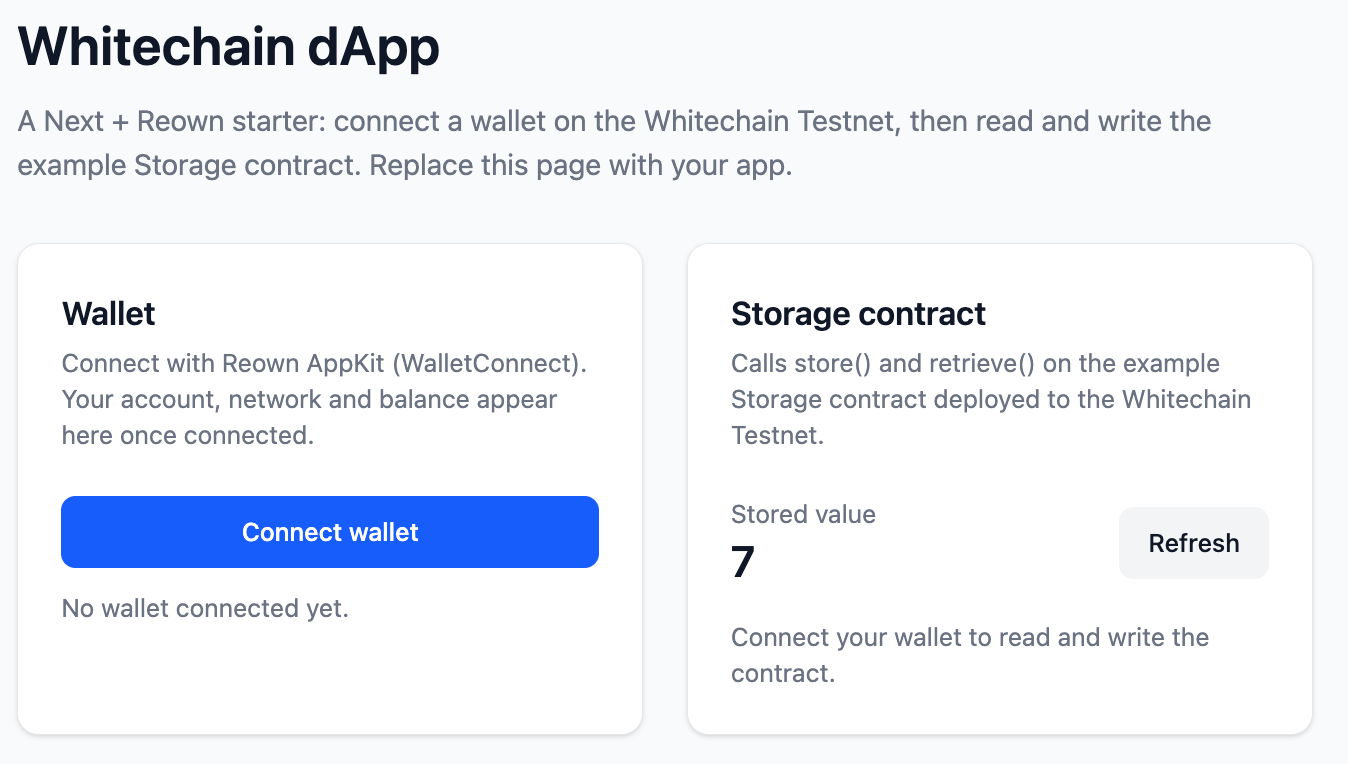
The Next dapp: wallet and Storage contract cards
Project layout
Components
The web3 layer lives insrc/lib and the panels in src/components/web3. Each essential part is below, trimmed to the lines that matter.
Chain and wallet config
src/lib/wagmi.ts defines the chain with viem’s OP Stack chainConfig, then wires Reown AppKit over wagmi. Change the RPC URL to use your own node.
src/lib/wagmi.ts
Client providers
src/components/providers.tsx is a client component that wraps the app in the wagmi and TanStack Query providers. The root layout renders it around children, so any client island below can call the web3 hooks.
src/components/providers.tsx
Wallet state hook
src/lib/wallet.ts gives the panels one shape for account and network state. The connection itself is opened through the AppKit modal, not here.
src/lib/wallet.ts
Wallet panel
src/components/web3/wallet-panel.tsx opens the modal to connect, then reads the balance with wagmi.
src/components/web3/wallet-panel.tsx
Storage read
retrieve() is a public view call, so it runs over the RPC with no wallet connected.
src/components/web3/storage-panel.tsx
Storage write
store(uint256) is a write, gated on a connected wallet. The read refreshes once the transaction confirms.
src/components/web3/storage-panel.tsx
Troubleshooting
The wallet connects but the Storage panel stays disabled
The wallet connects but the Storage panel stays disabled
Set
NEXT_PUBLIC_STORAGE_ADDRESS and switch the wallet to Whitechain Sepolia (chain 1874).The build fails, or a wallet SDK is not found under Turbopack
The build fails, or a wallet SDK is not found under Turbopack
Keep the
resolveAlias shim in next.config.mjs (src/empty-module.ts) in sync with the wallet SDKs your connector set does not use.`pnpm install` reports an engine error
`pnpm install` reports an engine error
Use Node 20.18 or later.