> ## Documentation Index
> Fetch the complete documentation index at: https://l2docs.whitechain.io/llms.txt
> Use this file to discover all available pages before exploring further.
# Next dapp template
> Clone the standalone Whitechain Next dapp starter, connect a wallet through Reown AppKit, and read and write the Storage contract on Whitechain Sepolia.
The `whitechain-dapp-nextjs` starter is a Next frontend for Whitechain Sepolia with wallet connect and contract calls already wired. You clone it, add a Reown project id, and run. It runs on Next 16 with Turbopack, React 19, and Tailwind v4, with Reown AppKit over wagmi v3 and viem. It suits developers who want a working dapp without building the wallet layer by hand. For a static single-page app with no server, use the [Vite dapp template](/build/dapps/dapp-with-vite) instead.
Both configured variables use the `NEXT_PUBLIC_` prefix, so they are baked into the browser bundle. Keep server secrets out of them.
## What you get
* Wallet connect through Reown AppKit, with the connected account, network, and WBT balance.
* A public read of the Storage contract that shows the current value with no wallet connected.
* A write that stores a new value and refreshes the read when the transaction confirms.
* A standalone codebase: every dependency is a public npm package, and the web3 layer lives in `src/lib`.
## Before you start
* Node.js 20.18 or later and pnpm through Corepack.
* A Reown project id from [dashboard.reown.com](https://dashboard.reown.com).
* Optional: your own Storage contract. The template defaults to a public verified one, so you can skip this. To use your own, deploy with [Hardhat](/build/deploy/deploy-with-hardhat) or [Foundry](/build/deploy/deploy-with-foundry) and copy its address.
* Test WBT for the write transaction, from the [faucet](/learn/get-started/get-testnet-wbt).
## 1. Get the template
Clone the [templates repository](https://github.com/whitechain-labs/templates) and enter the dapp folder.
```bash Terminal theme={null}
git clone https://github.com/whitechain-labs/templates.git
cd templates/whitechain-dapp-nextjs
```
## 2. Install dependencies
Enable the pinned pnpm through Corepack, then install. Every dependency comes from public npm, so no registry token is needed.
```bash Terminal theme={null}
corepack enable
pnpm install
```
## 3. Configure the environment
Copy the example file and set the public values.
```bash Terminal theme={null}
cp .env.example .env
```
| Variable | Value |
| ------------------------------ | ------------------------------------------------------------------------------ |
| `NEXT_PUBLIC_REOWN_PROJECT_ID` | Your Reown project id. |
| `NEXT_PUBLIC_STORAGE_ADDRESS` | Optional. Defaults to a public verified Storage contract; set to use your own. |
`NEXT_PUBLIC_STORAGE_ADDRESS` is optional. The template defaults to a public, verified Storage contract on Whitechain Sepolia: [`0xC880eF22c01184a3Db08F2c306684311C48cB495`](https://explorer.testnet.whitechain.io/address/0xC880eF22c01184a3Db08F2c306684311C48cB495). Set the variable only to point at your own deployment.
## 4. Run the app
```bash Terminal theme={null}
pnpm dev
```
Open `http://localhost:3000`. The Storage card reads the current value over the public RPC right away. Select Connect wallet, approve the connection, and the account, network, and balance appear. For a production build, run `pnpm build` then `pnpm start`; the build uses `output: 'standalone'`, so you can deploy it as a Node server.
## 5. Read and write the contract
`retrieve()` is a view call, so the stored value shows without a wallet. `store(uint256)` sends a transaction. With a wallet connected on Whitechain Sepolia, enter a number and confirm it in the wallet. The value updates once the transaction confirms. Open the transaction on the [explorer](https://explorer.testnet.whitechain.io) to check it.
If the wallet is on another network, the panel shows a switch action. `store()` stays disabled until the wallet is on Whitechain Sepolia (chain 1874).
## How it looks
The home page shows a title and two cards. The wallet card connects a wallet through Reown AppKit, then shows the account address and WBT balance. The Storage card reads the current value with no wallet, and shows a number input and Store button once a wallet is connected on the right network.
## Project layout
| Path | What it holds |
| ------------------------------ | ------------------------------------------------------------ |
| `src/lib/wagmi.ts` | Chain, RPC, and the Reown AppKit and wagmi config. |
| `src/lib/wallet.ts` | The `useWallet` hook: account, network, disconnect, switch. |
| `src/lib/storage.ts` | The Storage ABI and address. |
| `src/components/providers.tsx` | The client providers: wagmi and TanStack Query. |
| `src/components/web3/` | The wallet and Storage panels. |
| `src/app/` | App Router: layout, page, and `/api/healthz`. |
| `src/empty-module.ts` | Empty module aliased for unused wallet SDKs under Turbopack. |
## Components
The web3 layer lives in `src/lib` and the panels in `src/components/web3`. Each essential part is below, trimmed to the lines that matter.
### Chain and wallet config
`src/lib/wagmi.ts` defines the chain with viem's OP Stack `chainConfig`, then wires Reown AppKit over wagmi. Change the RPC URL to use your own node.
```ts src/lib/wagmi.ts theme={null}
export const whitechainTestnet: Chain = defineChain({
...chainConfig,
id: 1874,
name: 'Whitechain Sepolia',
testnet: true,
nativeCurrency: { decimals: 18, name: 'WhiteBIT Coin', symbol: 'WBT' },
rpcUrls: { default: { http: ['https://rpc.testnet.whitechain.io'] } },
blockExplorers: {
default: { name: 'Whitechain Explorer', url: 'https://explorer.testnet.whitechain.io' },
},
});
const adapter = new WagmiAdapter({ projectId, networks, ssr: true });
createAppKit({ adapters: [adapter], projectId, networks, enableCoinbase: false });
export const wagmiConfig = adapter.wagmiConfig;
```
### Client providers
`src/components/providers.tsx` is a client component that wraps the app in the wagmi and TanStack Query providers. The root layout renders it around `children`, so any client island below can call the web3 hooks.
```tsx src/components/providers.tsx theme={null}
'use client';
export function Providers({ children }: { children: ReactNode }) {
const [queryClient] = useState(
() => new QueryClient({ defaultOptions: { queries: { staleTime: 10_000, retry: 2 } } }),
);
return (
{children}
);
}
```
### Wallet state hook
`src/lib/wallet.ts` gives the panels one shape for account and network state. The connection itself is opened through the AppKit modal, not here.
```ts src/lib/wallet.ts theme={null}
export function useWallet(): WalletState {
const { address, chainId, isConnected, isConnecting, connector } = useConnection();
const { mutate: disconnect } = useDisconnect();
const { mutate: switchChain } = useSwitchChain();
return {
address, chainId, isConnected, isConnecting, connector, disconnect,
switchChain: (id: number) => switchChain({ chainId: id }),
};
}
```
### Wallet panel
`src/components/web3/wallet-panel.tsx` opens the modal to connect, then reads the balance with wagmi.
```tsx src/components/web3/wallet-panel.tsx theme={null}
const { open } = useAppKit();
const { address, isConnected, isConnecting, disconnect } = useWallet();
const { data: balance } = useBalance({
address,
chainId: targetChainId,
query: { enabled: Boolean(address) },
});
if (!isConnected) {
return ;
}
// Connected: show the address, the formatted balance, and a Disconnect button.
```
### Storage read
`retrieve()` is a public view call, so it runs over the RPC with no wallet connected.
```tsx src/components/web3/storage-panel.tsx theme={null}
const { data: storedValue, refetch } = useReadContract({
abi: storageAbi,
address: storageAddress,
functionName: 'retrieve',
chainId: targetChainId,
query: { enabled: Boolean(storageAddress) },
});
```
### Storage write
`store(uint256)` is a write, gated on a connected wallet. The read refreshes once the transaction confirms.
```tsx src/components/web3/storage-panel.tsx theme={null}
const { mutate: storeValue, data: txHash } = useWriteContract();
const receipt = useWaitForTransactionReceipt({ hash: txHash, chainId: targetChainId });
useEffect(() => {
if (receipt.isSuccess) void refetch();
}, [receipt.isSuccess, refetch]);
// On submit:
storeValue({
abi: storageAbi,
address: storageAddress,
functionName: 'store',
args: [BigInt(inputValue)],
chainId: targetChainId,
});
```
## Troubleshooting
Set `NEXT_PUBLIC_STORAGE_ADDRESS` and switch the wallet to Whitechain Sepolia (chain 1874).
Keep the `resolveAlias` shim in `next.config.mjs` (`src/empty-module.ts`) in sync with the wallet SDKs your connector set does not use.
Use Node 20.18 or later.
## Related
* [Templates repository on GitHub](https://github.com/whitechain-labs/templates)
* [Vite dapp template](/build/dapps/dapp-with-vite)
* [Connect to Whitechain Sepolia](/learn/get-started/connect-wallet)
* [Use viem with Whitechain](/build/dapps/use-viem)
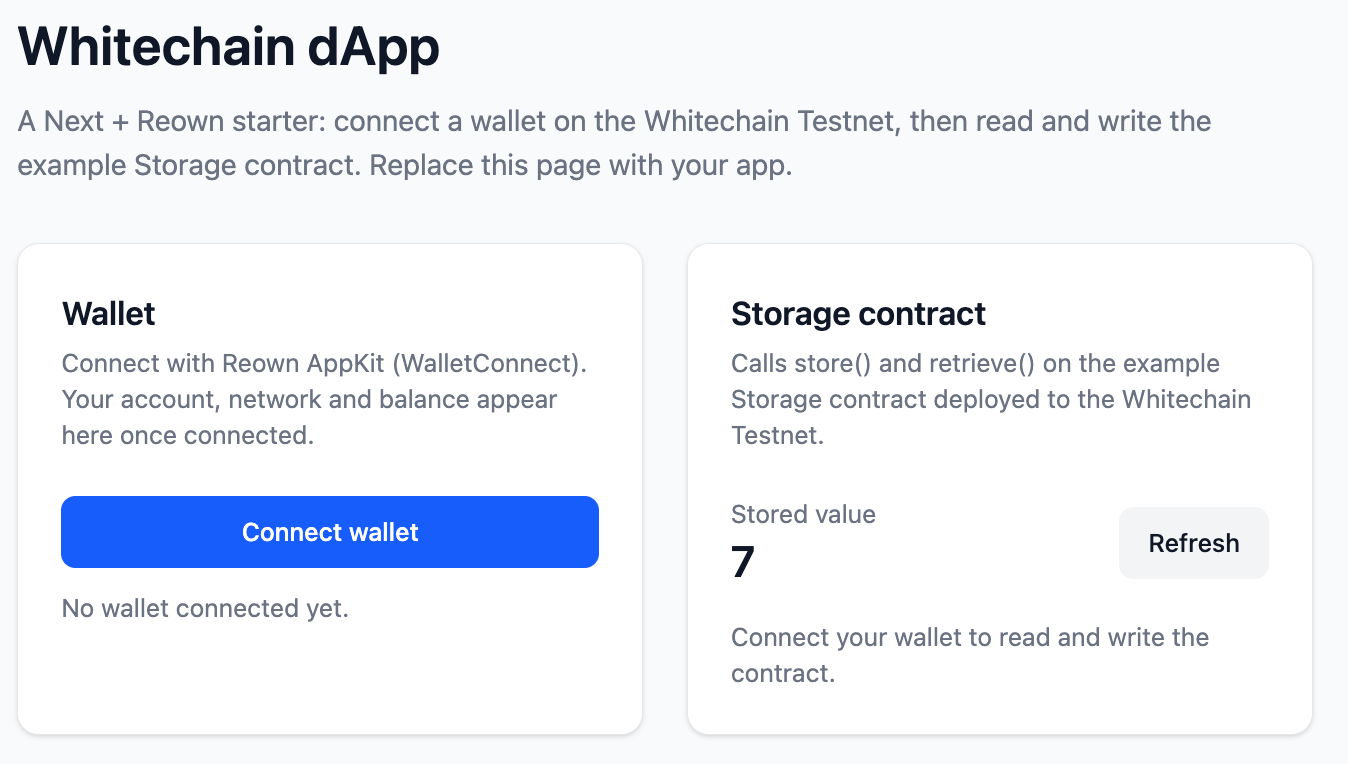 The home page shows a title and two cards. The wallet card connects a wallet through Reown AppKit, then shows the account address and WBT balance. The Storage card reads the current value with no wallet, and shows a number input and Store button once a wallet is connected on the right network.
## Project layout
| Path | What it holds |
| ------------------------------ | ------------------------------------------------------------ |
| `src/lib/wagmi.ts` | Chain, RPC, and the Reown AppKit and wagmi config. |
| `src/lib/wallet.ts` | The `useWallet` hook: account, network, disconnect, switch. |
| `src/lib/storage.ts` | The Storage ABI and address. |
| `src/components/providers.tsx` | The client providers: wagmi and TanStack Query. |
| `src/components/web3/` | The wallet and Storage panels. |
| `src/app/` | App Router: layout, page, and `/api/healthz`. |
| `src/empty-module.ts` | Empty module aliased for unused wallet SDKs under Turbopack. |
## Components
The web3 layer lives in `src/lib` and the panels in `src/components/web3`. Each essential part is below, trimmed to the lines that matter.
### Chain and wallet config
`src/lib/wagmi.ts` defines the chain with viem's OP Stack `chainConfig`, then wires Reown AppKit over wagmi. Change the RPC URL to use your own node.
```ts src/lib/wagmi.ts theme={null}
export const whitechainTestnet: Chain = defineChain({
...chainConfig,
id: 1874,
name: 'Whitechain Sepolia',
testnet: true,
nativeCurrency: { decimals: 18, name: 'WhiteBIT Coin', symbol: 'WBT' },
rpcUrls: { default: { http: ['https://rpc.testnet.whitechain.io'] } },
blockExplorers: {
default: { name: 'Whitechain Explorer', url: 'https://explorer.testnet.whitechain.io' },
},
});
const adapter = new WagmiAdapter({ projectId, networks, ssr: true });
createAppKit({ adapters: [adapter], projectId, networks, enableCoinbase: false });
export const wagmiConfig = adapter.wagmiConfig;
```
### Client providers
`src/components/providers.tsx` is a client component that wraps the app in the wagmi and TanStack Query providers. The root layout renders it around `children`, so any client island below can call the web3 hooks.
```tsx src/components/providers.tsx theme={null}
'use client';
export function Providers({ children }: { children: ReactNode }) {
const [queryClient] = useState(
() => new QueryClient({ defaultOptions: { queries: { staleTime: 10_000, retry: 2 } } }),
);
return (
The home page shows a title and two cards. The wallet card connects a wallet through Reown AppKit, then shows the account address and WBT balance. The Storage card reads the current value with no wallet, and shows a number input and Store button once a wallet is connected on the right network.
## Project layout
| Path | What it holds |
| ------------------------------ | ------------------------------------------------------------ |
| `src/lib/wagmi.ts` | Chain, RPC, and the Reown AppKit and wagmi config. |
| `src/lib/wallet.ts` | The `useWallet` hook: account, network, disconnect, switch. |
| `src/lib/storage.ts` | The Storage ABI and address. |
| `src/components/providers.tsx` | The client providers: wagmi and TanStack Query. |
| `src/components/web3/` | The wallet and Storage panels. |
| `src/app/` | App Router: layout, page, and `/api/healthz`. |
| `src/empty-module.ts` | Empty module aliased for unused wallet SDKs under Turbopack. |
## Components
The web3 layer lives in `src/lib` and the panels in `src/components/web3`. Each essential part is below, trimmed to the lines that matter.
### Chain and wallet config
`src/lib/wagmi.ts` defines the chain with viem's OP Stack `chainConfig`, then wires Reown AppKit over wagmi. Change the RPC URL to use your own node.
```ts src/lib/wagmi.ts theme={null}
export const whitechainTestnet: Chain = defineChain({
...chainConfig,
id: 1874,
name: 'Whitechain Sepolia',
testnet: true,
nativeCurrency: { decimals: 18, name: 'WhiteBIT Coin', symbol: 'WBT' },
rpcUrls: { default: { http: ['https://rpc.testnet.whitechain.io'] } },
blockExplorers: {
default: { name: 'Whitechain Explorer', url: 'https://explorer.testnet.whitechain.io' },
},
});
const adapter = new WagmiAdapter({ projectId, networks, ssr: true });
createAppKit({ adapters: [adapter], projectId, networks, enableCoinbase: false });
export const wagmiConfig = adapter.wagmiConfig;
```
### Client providers
`src/components/providers.tsx` is a client component that wraps the app in the wagmi and TanStack Query providers. The root layout renders it around `children`, so any client island below can call the web3 hooks.
```tsx src/components/providers.tsx theme={null}
'use client';
export function Providers({ children }: { children: ReactNode }) {
const [queryClient] = useState(
() => new QueryClient({ defaultOptions: { queries: { staleTime: 10_000, retry: 2 } } }),
);
return (